Monday, September 14, 2015

Photo Sharing in Libraries, Schools, and Information Organizations

Picking an account to do this analysis on was easy for me, not being biased is going to be hard.  I had the pleasure of hearing this person speak last year at the NCSLMA conference and started following his blog and Twitter feed the next day. His tweets are short but inspirational, funny, and a great way to promote  reading and the media program. His blogs go in detail about ways to promote books, things to do in your media center such as data collection - which can be a hard thing to get, and one of course, his week told in Vines.  I know some of my classmates are not school media specialist and might not be familiar with him, for my cohorts who are this is one Twitter account and blog you should follow.  John Schu@MrSchuReads.  http://mrschureads.blogspot.com/. You will get a lot of great ideas.
          Mr. Schu is a speaker, teacher, and book advocate. Through his travels he has worked with a lot of authors and illustrators so a lot of his tweets are linked to other author's page. He promotes reading events that are happening around the country.  His post also range from things he has accomplished with his students, to conferences he participated in, and new and upcoming books. He uses book trailers often. His blog profile reads, "

About Mr. Schu

I am a K-5 teacher-librarian who works diligently to put the right book in every child's hand. Book trailers are one way to connect readers with books."
 Here is a quick example of a book trailer he made to promote the new book Marvel.:

Digital Photography Exercise

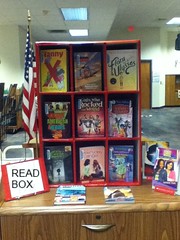
         When I started this task immediately I thought of "Standard 1. School library media coordinators demonstrate leadership. Element c. School library media coordinators advocate for effective media programs." What better way to promote and advocate for your media center than by "visually showing" the community you represent what is happening in your media center.  The truth is, unfortunately, this is the only way some will ever see the inside workings of your program.  With this in mind, I decided to take the pictures with the statement, "What is new @your library?" as my guiding question.  I used Flickr, Pinterest, Instagram, and Twitter.  I found this was a wonderful way to share the "coming attractions" to get the students interested in what will be on our shelves next. Last year one of the final days of media classes I did a book tasting of the new books headed to our shelves in 2015-2016. I had a student come in and ask me about that book. That made realize the importance of promoting new books even if they are not ready for the shelves yet. The students eagerly wait and have something to look forward to. I have added a photo album page to my school's media page entitled coming attractions.  The students also know to head to our "Read Box" to find the new books once they are ready.
 Okay Sport's Fan, you told me what you wanted and I listened.  Just a glimpse of coming attractions at LCES media center.:
"Read Box"
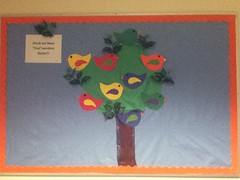
I wanted parents to see that their child's voice is important to me. So I shared the two new incentives I started this year. The "Check out these "Tree"mendous books. " board. This board is going to be used as  a way for students to promote and share books that they think others would enjoy.
  Check out these "Tree"mendous Books
I aslo started the "Did You Know?" wall in the nonfiction section. The students can write down on a post it any interesting fact they learned from reading their nonfiction book. I can't wait to see what they learn this year.


          I was worried at first that the creations of these sites could lead to violating the school systems rules of not being friends with students on social media websites; however with these accounts you don't have to accept, follow, or friend anyone. You are only promoting your media program and that is acceptable.  

Sunday, August 30, 2015

Curation Collections

As school librarians we can think of digital collection curation as the selection and assembly of a focused group of resources into a Web-based presentation that meets an identified purpose or need and has meaning and context for a targeted audience (Valenza, 2012). 

My purpose for creating a curation tool is to help reach parents and provide them with steps and tools they can use to help their child(ren) become better readers.

When examining these different tools I looked at them through two different lenses, professional use and patron friendly. Some fit both categories and others were more designed for professional uses.  I have used several. I love Pinterest and I have created several boards on it that are both professional and plain fun. While Pinterest is a good site where I have gained a lot of useful lessons I think for parents though it wouldn't be as "professional" as I feel it would need to be. While you can click on certain boards to help you focus, Pinterest is still very easy to get lost in.  Pinterest is an example of both squirreling and information overload.  Here is an example from one of my boards. https://www.pinterest.com/amitchell1999/school/.

I have two Symbaloos on our school's website. While this is more focused, professional, and patron easy to use I decided to not use this one because I am very familiar with it already.   http://lces.randolph.k12.nc.us/?PageName=bc&n=233669.

I have created a LiveBinder in a previous class. It has the professional feel to it with the tabs to store information where you can go more in depth. Parents are busy and want to be able to quickly access the information they need. They don't need to click through tabs to find what they are looking for.

Learnist and Listly are both sites that I feel would be better used as a professional resource to store websites, lessons, and articles that can help you professionally.  I like the list feature of it and being able to follow different lists on Listly.  It is easy to use and user friendly however knowing my audience I need something that requires less work than scrolling to find the article that they want to read.

Storify is a neat tool that allows you to create stories using other web site's information. This would be a wonderful tool for high schoolers to use to report on events from history and current events. Being able to get different perspectives on the events that happened and sharing them in a digital way would be an engaging activity for them.  Through this they could learn about biases, propaganda, and how to locate reliable information for their stories. If you haven't checked this one out here is a story from Storify. https://storify.com/king5seattle/fallen-firefighter-memorial.  This could be used for professional, educational, and personal use. However this would not meet the requirements of my goal.

Scoop It! was another new tool for me.  I have never used it. I created an account and have a paper set up. The feature that I like is that you can add your twist to the "scoop". The other nice feature is that you can access scoops from others and not have to surf the web to find other ideas.  It is similar to collaborating with other professionals in your field and getting the "scoop" on what they are doing so you can modify it to fit your needs. This is a great tool for personal or professional use.


Diigo was also a new tool for me.  I have created my own account and used it throughout my research of the tools. The extension addon helps you highlight notes, take screenshots of favorite parts, share, and mark to read later. It is a great bookmarking tool. This is definetly something that students and patrons that do a lot of research could use to help them take notes quickly and effectively.  For my purpose of sharing with parents though it wouldn't be the best tool. Here is an example from my Diigo page:


I feel in love with Pearltrees. It has a professional feeling, focused on one topic, easy to create, and easy for patrons to use. This is where I decided to create my curation collection on Parent Resources for Reading.  Pearltrees is very similar to Pinterest yet it has more of a professional look about it when sharing with parents. I love the feature where you can add an extension to Chrome where you can save a site, picture, and video as you surf.  This was a common feature for most of the sites now.  Here is my curated collection entitled Parent Resources.
Parent Resources, by mediateacher5915 http://www.pearltrees.com/mediateacher5915/parent-resources/id14646996

Valenza, J. (2012). Curation. School Library Monthly, Volume XXIX(1). Retrieved August 30, 2015, from http://www.schoollibrarymonthly.com/articles/Valenza2012-v29n1p20.html

What's happening in the Media Center

This week was orientation week  at my school for half of my classes. I was sharing how I wanted them to be active participants and the media center to be an interactive place for them. When I introduced two of my ideas the students were really excited about these additions this year.

My first new idea is an interactive bulletin board called, "Check out these "Tree"mendous Book?" After returning books they can write a short book trailer and post it on the board.

My next idea is called a "Did you know wall?" in the nonficition section. I explained it saying that when they read nonfiction books they sometimes learn new things that they really want to share. Well now they have a new place to do it.  One of my students already renamed it "The Thinking Wall." I love how they have taken ownership in this and we haven't even started it.


Curation Collection from the Eyes of an Elementary Media Specialist

   Browsing the tools and reading the articles I had so many aha moments. Lesson after lesson popped into my head as I read the articles. I always do a "How do you evaluate information on the Internet?" unit with my students but I have never looked at it from the point of view of where they truly get their information: these curated sites. At school they may type into Google, however at home they use Instagram, Facebook, Twitter, Tumblr, and other such sites to gain information. It is important that at a young age they learn how to weed through the information to find accurate and reliable sources. The statement, "Librarians can position themselves not just as curators, but as authorities. Librarians can help users learn how to curate, but also how to evaluate curated sources. (Ovadia, 2013)" says it best.  It is our job to go beyond the classroom applications and help our patrons and students gain the skills that they need to be transliterate in the ever changing digital society that we live in.  
    As an elementary media specialist I have a fine line of CIPA and COPA laws that I have to follow so allowing students to actually build curated collections and seek reliable information for these collections will be a challenge this year. However, I feel that it is my duty especially for my 4th and 5th graders to show them how to weed through the information that they see everyday.   


 Ovadia, S. (2013). Digital Content Curation and Why It Matters to Librarians. Behavioral & Social Sciences Librarian, 32(1), 58-62. Retrieved August 30, 2015, from http://www.tandfonline.com.libproxy.uncg.edu/doi/full/10.1080/01639269.2013.750508#abstract 

Saturday, August 29, 2015

Essential Question

At the end of last year I realized that I was not connecting like I needed to with one of the major groups in my elementary school, the parents.  So this past summer I started planning and brainstorming how I could reach this group.  I wanted to help them see that the media center is there for them also and help give them tools to help their child(ren) develop a love of reading.  I am planning to hold quarterly afternoon reading events with parents and students. I am going to read a favorite book and then split the groups into reading stations.  I spoke with the public librarian and she is planning to come to one of the events also.  This would also be a great time to share a collection of online sites and activities that they can use to help their child at home. 

So my essential question for the class and this school year is: "How can I use digital tools to provide parents with resources they need to help their child with reading skills at home?"

Tuesday, August 18, 2015

Welcome to My Blog

Hello all,

Welcome to my blog. I can't wait to share ideas that I have and lessons I learn from my students.  I think one of the best way to improve as a media specialist is to learn from others. I am looking forward to learning from everyone.